











Boxing Day Offer - use code BOXINGDAY20 for 20% off all Dash Cams!
- Overview
- Specification
- Installation
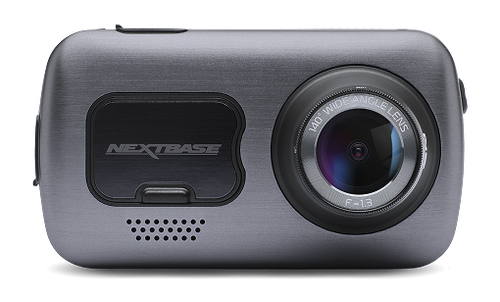
622GW
All eyes on the road
Always-on safety
Big on protection
Stay visible on the grid
Precise location sharing enabled by what3words tells the emergency services exactly where you are – even if you aren’t sure.
No data, no problem
Embedded precision location technology means emergency services can find you to within 3m, anywhere on Earth. Your location: always known and easy to share
Emergency SOS response
An ally in an accident
Crash detection feature automatically notifies emergency services if no movement is sensed after impact. The 622GW has got your back – wherever you are
National Safety Portal
Direct line to justice
Play your part in making UK roads safer by quickly and easily submitting video footage of dangerous driving to the police
24/7 protection
Intelligent Parking Mode uses a motion sensor to guard your car even when you aren’t there, giving you peace of mind every day, everywhere.
Never miss a moment
Capture the world with your onboard all-seeing eye. Glorious high-quality 4K and advanced image stabilisation means no detail missed, no detail too small – and no blurring.
No blurred moments
Image Stabilisation Off
Image Stabilisation On
Rock steady, detail heavy
Digital image stabilisation reduces vibration enabling crystal clear, slick footage. Always capture the finer details of the world around you.
Voice control
All the voice control features you love, now in your car. Make calls, play your favourite tunes, or save dash cam recordings without lifting a finger – just use your voice while keeping your eyes on the road and your hands on the wheel
#Nextbase on the road
Discover our rear-view cameras & accessories
Sold out
Our most popular option, Pair it with your Dash Cam to create a front and rear dash cam and know you have all the angles covered.
gallery
Sold out
This camera connects directly to your Dash Cam and records the rear view of your journey, so if there's a rear impact, you'll be covered.
gallery
Sold out
Capture vehicles beside you as well as your passengers for a complete view of everything that happends inside and around your car.
gallery
Our best Dash Cam yet
Dash Cam Essentials
What's in the box
Resolution
Touch Screen
Intelligent Parking Mode
Emergency Response
WiFi
Image Stabilisation
Voice Control
What3words
10x GPS
Enhanced Night Mode
Click &Go Pro Mount
G Sensor
Reflection Free Lens
Wide Viewing Angle
Enhanced Night Vision
Auto Sync
My Nextbase Suite
Loop Recording
GPS Tracking
Extreme Weather Mode
Super Slow Motion
High Dynamic Range
4K
The ultimate Dash Cam recording
In the event of an incident where the driver is unresponsive, Nextbase Emergency SOS can alert the emergency services as to your location and approved personal details. This ensures emergency services can respond quickly without relying on other road users – essential support when driving on rural or quiet roads.
The 622GW 4k dash cam uses a resolution of 3840 x 2160 @30fps, boasting image quality comparable to high-end TVs and cameras. It provides improved contrast and colour range compared to HD footage, meaning recording quality is as good as it gets with the 622GW.
When a Rear Cam is attached
The 622GW will continue to record in 4K when connected to a Nextbase Rear Camera Module, with your Rear Module recording in full HD quality of 1080p at 30fps. This safeguards your vehicle from multiple angles and gives you greater peace of mind. When recording in 4K, it is recommended you use a Nextbase U3 microSD card. A 4k dashcam can be the best solution for not losing any details when recording.
At a glance
Resolution
4K @ 30fps, 1440 @ 60fps, 1080 HD @ 120fps
Screen
3” HD IPS Touch screen
Image Stabilisation
Yes
WiFi
QuickLink Wi-Fi
Night vision
Yes, Enhanced Night Mode
Bluetooth
Yes – Bluetooth 5.0
What3Words
Yes
GPS
10Hz
Intelligent Parking Mode
Yes
Emergency Response
Yes
Voice Control
Built-in
Polarising Filter
Built-in
Viewing Angle
140°
Lens
6 layer f1.3
Module Compatibility
Rear Window Cam, Car Rear View Camera, Cabin View Cam
What’s in the box
Click&Go PRO GPS Mount, Power Cable Fitting Tool, Spare 3M Adhesive Pad, USB Cable, Car Power Cable
Touch Screen
Touch screen from the 322GW up
In the past, a touch screen panel has been something reserved for top of the range models such as the 612GW. However, with the all-new Series 2 products, we have introduced touch screen panels from the 322GW up.
There are two main benefits to using a touch screen. Firstly the Dash Cam can be made smaller and less obtrusive as we no longer need to add buttons beside the screen.
Easy selection
Secondly, it makes the unit a lot easier to use. With each option taking up 1/4 or 1/2 of the screen, it is a lot easier to make the selection you need.
Furthermore, this has enabled us to include on-Dash-Cam editing, where you can simply edit your videos on the Dash Cam itself before viewing and sharing a smaller clip showing just the incident.
Emergency Response
Nextbase Emergency SOS
can alert the emergency services
In the event of an incident where the driver is unresponsive, Nextbase Emergency SOS can alert the emergency services as to your location and approved personal details. This ensures emergency services can respond quickly without relying on other road users – essential support when driving on rural or quiet roads.
When an incident is detected, the Emergency SOS system will go through an anti-false-positive master process. If this master process completes, the phone enters a ‘beacon’ mode, where if the phone remains still or is unanswered then the emergency alert is sent.
Master Process
When an incident is detected, the Emergency SOS system will go through an anti-false-positive master process. If this master process completes, the phone enters a ‘beacon’ mode, where if the phone remains still or is unanswered then the emergency alert is sent.
The emergency alert that is sent to the integrator and emergency services includes GPS location and heading as standard, but also other personal details such as medical history, blood type and allergies.
Why is it useful?
When an incident is detected, The MyNextbase Emergency SOS service is designed to alert the emergency services in situations where the user has been involved in an accident rendering them incapable of alerting the emergency services themselves.
The service will not alert the emergency service of all accidents – they will not be notified of low-speed incidents, for example, nor accidents after which the alert notification process is cancelled before the emergency services are notified (for example where the user cancels the alert because they are not incapacitated following the accident).
Parking Mode
How does this work?
Intelligent Parking Mode records any bump or physical movement on the vehicle while your car is parked. With a parking camera for your car, you will know exactly when and where your car has been bumped. This car security camera system adds an extra layer of protection to give you greater peace of mind.
Turn it 'ON' or 'OFF'
Intelligent Parking Mode is an option that can be selected in the menu of every Series 2 Dash Cam.The camera will enter Parking Mode after 5 minutes of the car being stationary or when the ignition is turned off.
G Force Assistance
When the camera is in Parking Mode, the camera will automatically set the G sensor to high to pick up physical impacts to the vehicle.
If your car is hit, the camera will power on and record a 30-second protected file. It will remain powered on for 5 minutes and if no further impact is detected the camera will shut down.
WiFi
Share video and photo files directly
The Wi-Fi feature in Nextbase Dash Cams enable you to download and share video and photo files directly to your phone or tablet. You can then share footage with your family, friends, insurance provider or the police. Videos can easily be shared via all the major sharing platforms including Facebook, Twitter and YouTube, as well as directly via the Nextbase website. The MyNextbase Connect App acts as your own personal storage point for all Nextbase clips. You won't miss a thing with our wireless dash cam!.
Wi-Fi can be very useful
When you need to send a clip to your insurance provider after an incident has taken place. Instead of having to wait for access to a PC or Mac you can send over the relevant footage using your mobile device. The footage can also be edited before sending, enabling you to trim the video, remove audio and compress the file. A link is then provided for your insurance company to download after sending. A wifi dash cam helps streamline the whole process.
Dash Cam to phone connection
The Dash Cam does not need to be removed from the vehicle to use Wi-Fi and it eliminates the need for having to use a PC to view the footage on as you can directly store the footage on your phone. There is no need to remove the SD card or use the cables provided, saving you time and effort.
Dual file recording
Dash Cam models recording at a higher resolution (1440p HD and 4K) record both high res and low res file with our dash cams with wifi. The high res files are used for playback. Low res files allow for efficient streaming.
Wi-Fi connection
The Wi-Fi connection is set up directly between the Dash Cam and the phone/tablet. It means you do not have to use mobile data, or a Wi-Fi hotspot, as the Nextbase Wi-Fi can be turned on easily by holding the Wi-Fi button for up to 3 seconds on the Dash Cam or manually via the setup menu for the cam.
All current Nextbase Dash Cam models have Wi-Fi, excluding the 122 and 222 models.
Wi-Fi can only be used on iOS (10.3 or later) and Android (5.1 and up) devices. The MyNextbase Connect app can be downloaded for free via Google Play Store and Apple App Store.
What’s in the box
Box contents:
Click&Go PRO GPS Mount, Power Cable Fitting Tool, Spare 3M Adhesive Pad, USB Cable, Car Power Cable
Enhanced Night Vision
The feature for low-light conditions
Our feature-filled 322GW, 422GW & 522GW Dash Cams have Nextbase Enhanced Night Vision, capable of picking up the finer details such as number plates and road signs even in extreme low-light conditions. The 422GW and 522GW, with a 6-layer f1.3 lens, are able to record at 1440p and use the latest light sensor technology to capture and process superior image quality. A night vision dash cam will allow getting a clear view of your surroundings, even at night.
Wide Viewing Angle
140 Degrees
Capture more detail
From the 222 model and up, the viewing angle increases to 140 degrees. This means that you are able to capture more detail either side, such as the pavements and road signs.
Given this, you might think that it would be even better to go to 160 or even 180-degree lenses, but in reality there is a sweet spot at which the viewing angle is wide but the images of cars in front of you are not distorted. As soon as you go above around 150 degrees with a lens, this distortion makes Dash Cam videos fairly redundant as evidence. This is why we believe that using a high-quality lens with a clear image and a wide view is the best option.
Loop Recording
What is loop recording on a Dash Cam?
Loop recording on a Dash Cam allows for continuous recording, even if the SD memory card reaches full capacity. This means older files are overwritten once the SD card reaches its file size limit. The Dash Cam will be recording on a continuous loop when powered on, so will always be recording.
In the event of an incident, any files that have been protected by activation of the G-Sensor, or by manually pressing the File Protect button, will not be overwritten and will stay on the SD card. This means important clips that can be used for insurance purposes or sending to the Police will stay locked on the card and will not be deleted.
Assorted file segmentation
When reviewing footage to share, instead of recording one large file, loop recording sorts each file into manageable segments at around three minutes. This makes the file easy to download and transfer. This is particularly useful for wi-fi enabled Dash Cams, as the file can be downloaded quickly and shared to your phone or tablet.
Regular SD card formatting is essential
With loop recording, the card will need to be formatted at some point. This is when there is a build-up of protected files stored on the card, which shortens the recording time for the Dash Cam. It is generally recommended to format the SD card once a month to free up space. The card can easily be formatted via the set-up to delete all files, including any protected files.
Dash Cam loop recording time
The default recording time for most Series 2 Dash Cams is one minute for each file, making sizes manageable and easy to view, but this can be increased to three minutes. At 1080p HD, you will get up to four hours of recording before the cam loops over.
The volume of recorded data depends on the size of your SD card. The 32GB records around 2 hours of footage. The 64GB around 4 hours and the 128GB around 8 hours.
By altering the recording resolution, or adding a rear camera, the recording capacity can be either increased or decreased. For example, recording at 720p resolution will increase the recording time compared with recording at 4K Ultra HD.
10x GPS
Combined satellite connection
Nextbase Series 2 Dash Cams (322GW and up) use two satellite systems combined to give the most accurate and reliable GPS fix. We take data from the American GPS satellite and the Russian (GLONAS) system to provide unparalleled service.
Data reading
On top of this, the Nextbase Series 2 Dash Cams refresh at 10HZ. This means that every second the Dash Cam captures 10 data readings, ensuring the trace shown on Google Maps is accurate and smooth.
By having such a high refresh rate, the GPS system also captures very accurate speed and acceleration data, which is shown in MyNextbase Player and can be critical information if there is an incident.
Built-in with
The Hotstart feature is also built-in with every Series 2 GPS model, meaning the Dash Cam will remember the last satellite positions for up to two hours. This means you can pop to the shops and get an almost instant GPS fix when you get back in the car.
Reflection Free Lens
How it works in bright sunlight?
In bright sunlight, the filter will reduce glare and reduce bright contrast levels to help capture important number plate detail. The filter has a rotating bezel, so you can set up the reflection-free lens exactly how you need in your vehicle.
Always capture the very best video quality with the Nextbase Reflection-Free Polarising Filter.
When you are recording videos through the glass of a windscreen, you will often notice the reflections of heating vents and other parts of the car on some recordings. To reduce this effect, the Nextbase Polarising Filter is able to remove all windscreen reflection and just capture the events in front of you.
This Polarising Filter is included on the Nextbase 522GW model upwards and is an optional accessory for the rest of our Dash Cam range.
GPS Tracking
GPS Tracking
GPS records accurate speed and location data for your Dash Cam while you're driving. This will keep track of your vehicle’s physical location, to show the route travelled, and the speed you are going. This can be vital in pinpointing exactly where an incident has happened, which can be crucial in an insurance claim.
Do I need GPS on my Dash Cam?
GPS can be vital in the event of an incident. It provides useful information, such as road names and where other vehicles are located at the time of an incident. This can be useful after an incident has taken place on an unfamiliar road, with details often difficult to remember after the fact.
GPS will also show the speed travelled, displayed in mph or km/h depending on the user’s preference. This can also prove to be valuable information in the event of an accident. On playback, the footage will show speed limit signs and road names to aid the driver’s case and help prove they were not at fault. The speed picked up by GPS satellites when driving can often provide more accurate information than a vehicle’s speedometer. Now you can do all of this with a GPS dash cam.
Your footage is the evidence
The information picked up by GPS can be vital when filing an insurance claim. It will feature the time, date, speed, location and direction of a collision, which helps speed up a potential claim without having to gather all the details manually before sending on to the relevant party. A Dash Cam with GPS can provide any extra locational information that may be needed.
Evidence for the Police
The GPS data on footage can also be used as evidence for the Police and Courts when reviewing Dash Cam footage. It can be particularly useful in identifying insurance scams such as ‘crash for cash’ by identifying who was at fault, picking up any unusual movements via the G-Sensor data. The GPS feature on Dash Cams is worldwide so does not need to be altered when driving outside of the UK, as it will still pick up the same information with the aid of Google Maps.
Useful for young drivers
The GPS dash cam can be useful for young or first-time drivers as they will know their speed and location is being recorded, which in turn can encourage better driving. Driving instructors may also wish to use GPS data to review and demonstrate speed to students after lessons.
Click&Go PRO Mount
Magnetic Power Mount
Our exclusive Click&Go PRO™ Car Mount has integrated magnetic power connectors so you can install and remove your Dash Cam with just one hand. The high strength neodymium magnets on the mount and Dash Cam click themselves together so you are ready to go.
Installation
The power cable installs directly into the mount, allowing the Dash Cam to be completely wireless. All Series 2 Dash Cams include the Click&Go PRO™ mount as standard, with a 3M adhesive pad as the default fitting method.There are over 115 patents and registered designs worldwide covering the Series 2 Dash Cams, mounts and modules.
Image Stabilisation
4K on the go
With 4K recording ensuring cinematic image quality, we have ensured this footage is as unwavering and slick as ever with the addition of this all-important feature. Digital Image Stabilisation allows you to see the finer details in a recording, such as number plates, road signs and other critical details that could be crucial when sending footage to the police or your insurance provider.
Night Vision
Improved picture clarity
The Nextbase 122 and 222 Dash Cams have Nextbase Night Vision. Sensors improve picture clarity for night-time driving and the in car camera adjusts the contrast and brightness to further enhance the footage, helping to make out necessary details in the event of an accident.
Upper range models
Our models further up the range (322GW, 422GW and 522GW) have Enhanced Night Vision.
The flagship 622GW has Enhanced Night Mode for the optimum view day or night.
What3words
In need of assistance but don’t know where you are?
We are here for you. In partnership with what3words, we can pinpoint your exact position to a three-metre square location. This can be shared with the emergency services or roadside assistance to help them locate you quickly and easily.
That's not all
what3words normally requires a data connection to work, but embedded within the 622GW it is able to provide your precise location at all times and share this with the emergency services, even when working offline. You can feel safe in the knowledge that what3words and Emergency SOS will back you and your family up, no matter what.
Enhanced Night Mode
Extra security for night time driving
At Nextbase we recognise the enhanced danger that comes with night-time driving, so we give you extra back-up at night. We have improved the sensor and software to ensure that the 622GW records as much detail as possible, even on the darkest roads. An overnight car security camera will provide you with some extra protection during the last hours of the day.
Sensor
The new sensor used in the 622GW has larger pixels, allowing more light into each one, plus the camera automatically detects light levels and enhances the image as it is being recorded.
Extreme Weather Mode
Invented to battle reduced visibility
Fog is a major cause of road traffic incidents in the UK, and Nextbase's Extreme Weather Mode could prove vital in identifying vehicles and number plates in dangerous conditions. Whether you are involved in or witness an incident in misty conditions, this is the only Dash Cam that will use built-in algorithms to provide the clearest image.
Turn it ON or OFF
If you are involved in or witness an incident in misty conditions, this is the only Dash Cam that will use its built-in algorithms to provide the clearest image. It can be turned ON and OFF in Dash Cam settings.
Voice Control
All the features you love from Voice Control, on the move
Nextbase has achieved another world first with the introduction of Voice Control to its 422GW, 522GW and 622GW models.
Using your Dash Cam, you can ask to play music, place calls, queue up an audiobook, read the news, check the weather, control smart home devices, get directions, find parking, and more — all while you keep your hands on the wheel and eyes on the road.
Using your Dash Cam, ask Alexa to play music, read the news, check the weather, control smart home devices and more.
Simply say, “Alexa, play BBC Radio 1” or "Alexa, what will the weather be like in London today?”
Get directions, find parking and more, all while you keep your hands on the wheel and eyes on the road.
Ask, "Alexa, how do I get to Manchester?” and turn-by-turn directions will automatically be shown on your smartphone using your chosen map provider.
Talk directly to your Dash Cam with Alexa built-in to use commands such as "start recording", "stop recording", "protect a recording" and "send to my phone".
Amazon, Alexa and all related logos are trademarks of Amazon.com, Inc. or its affiliates.
Alexa Skills
The much-anticipated MyNextbase Skill is now available to control your Dash Cam using voice. The addition of Alexa Skills to the Dash Cam's offering is the latest in Nextbase's commitment to safe driving. The Nextbase Alexa Skill gives owners the ability to use voice commands to instruct their Dash Cam, such as "start recording", "take a picture “, "stop recording", without having to take their eyes off the road or their hands from the steering wheel.
| Function | What you say |
Start recording | "Alexa, ask my Dash Cam to start recording" |
Stop recording | "Alexa, ask my Dash Cam to stop recording" |
Take photo | "Alexa, ask my Dash Cam to take a photo" |
Protect a file | "Alexa, ask my Dash Cam to take a photo" |
Screen saver on | "Alexa, ask my Dash Cam to turn screen saver on" |
Screen saver off | "Alexa, ask my Dash Cam to turn screen saver off" |
Picture-in-picture on (show rear cam) | "Alexa, ask my Dash Cam to show rear cam" |
Picture-in-picture on/off (show front cam) | "Alexa, ask my Dash Cam to show front cam" |
Speed display on (show speed) | "Alexa, ask my Dash Cam to show speed" |
Speed display off (hide speed) | "Alexa, ask my Dash Cam to hide speed" |
Enable audio (microphone on) | "Alexa, ask my Dash Cam to enable audio" |
Disable audio (microphone off) | "Alexa, ask my Dash Cam to disable audio" |
Increase video exposure | "Alexa, ask my Dash Cam to increase exposure" |
Decrease video exposure | "Alexa, ask my Dash Cam to decrease exposure" |
For more details please see Alexa Skills Page
MyNextbase Connect App– Nextbase Dash Cam Control
Download MyNextbase Connect app to activate the Alexa. Full links available on the MyNextbase Suite feature page.
Minimum mobile phone requirements
8+
Android
13+
ios
4.2
Bluetooth
Super Slow Motion
Motion captured in 1080p/120fps
Super Slow Motion is an exclusive feature with the Nextbase 622GW. This enables you to play footage at extremely reduced speed in 1080p at an incredible frame rate of 120 frames per second. This feature can be essential in helping identify what has occurred during an incident and capturing important details such as number plates and road signs, which can be vital for proving fault.
Playback on MyNextbase Player
This is an exclusive feature for the 622GW Dash Cam. It allows you to playback footage at 120 frames per second at 1080p. This high frame rate playback is ideal for identifying precisely what has occurred before and during an incident.
MyNextbase Connect app on your smartphone, or MyNextbase Player on your PC or Mac.
Wide Dynamic Range
What is Wide Dynamic Range?
Wide Dynamic Range (WDR) processes images to ensure clear recordings in bright and dark light. This allows the Dash Cam to combine multiple images at different levels of brightness to create one superior image.
More details
The benefit of WDR in a Dash Cam is to record more detail in contrasting light areas. WDR increases the capacity to view a greater level of detail and enhances the ability to distinguish important features and shapes.
WDR is designed to be used in situations where there is a large difference in foreground and background light levels (there is a wide dynamic range of light). This is useful when viewing number plates at night, which can be tricky when plates are reflective. WDR helps solve this issue by improving the quality and clarity of the image, which is of vital importance when passing on evidence to an insurance firm or the police in the event of an incident.
Multiple frames combined
WDR captures more detail by taking multiple frames at different contrasts then combining them to create one enhanced image. This provides the best image possible whether it is in direct sunlight or under the heavy contrast of street lights at night. For example, when driving from the shade into direct sunlight, the cam will automatically adjust the recording to make sure it is always recording the optimum image.
Dash Cams with WDR technology have advanced sensors that can produce a wider range of lighting, allowing them to record in a higher light depth. This method requires an extremely fast light sensor, which is only available on advanced Nextbase models. With the implementation of WDR, Dash Cams have an improved ability to provide enhanced images in the most challenging of conditions.
High Dynamic Range
What is HDR?
High Dynamic Range (HDR) sets about improving the contrast in an image while maintaining clarity. HDR improves image quality with better contrast, greater brightness and enhances the colours seen, taking multiple images at different exposures to give the best results.
HDR High Dynamic Range (HDR) sets about improving the contrast in an image while maintaining clarity. HDR improves image quality with better contrast, greater brightness and enhances the colours seen, taking multiple images at different exposures to give the best results.
Bright sunlight
HDR images can present a greater range of luminance levels than can be achieved using only Standard Dynamic Range (SDR) in many real-world scenes containing very bright, direct sunlight to extreme shade. This is often achieved by capturing and then combining several different, narrower ranges and exposures of the same area.
Exposure value (EV) differences
In Dash Cams, dynamic range is measured in exposure value (EV) differences. An increase of one EV represents a doubling of the amount of light. Conversely, a decrease of one EV represents a halving of the amount of light. Therefore, revealing detail in the darkest of shadows requires high exposures, while preserving detail in very bright situations requires very low exposures. Most Dash Cams cannot provide this range of exposure values within a single exposure, due to their lower dynamic range.
This improvement to higher-end Dash Cam models ensures crisp images with as much detail as possible being captured in the varied weather, light and road conditions. The feature ensures images captured in all conditions can be utilised as an independent witness during insurance claims.
Auto Sync
Bluetooth & Wi-Fi Connectivity
Using Bluetooth 4.2 Low Energy technology and wi-fi connectivity, your Nextbase Dash Cam can easily send the latest video files to your smartphone or tablet.
Dual file recording
Your Dash Cam will automatically record two video files (High and Low resolution), meaning you can easily view videos quickly while having the full high-quality file available to download if you need to zoom in later.
Once on your phone
it is quick and easy to edit and share your footage with your insurer using the MyNextbase Connect App on Android and iOS.
Bluetooth Autosync also means your Dash Cam is automatically connected to your phone when you enter the car, ready to use the Emersosgency SOS service (322GW and above) and Alexa Voice Control (422GW and above).
Minimum mobile phone requirements
6+
Android
13+
ios
4.2
Bluetooth
My Nextbase Suite
Introducing the MyNextbase Suite: software, app and cloud storage
This suite has been created specifically to complement the footage our Dash Cams capture. All aspects revolve around taking footage the Dash Cam has recorded and giving you the freedom to do with it as you please. Whether that be viewing, editing or sharing it on MyNextbase Player or Connect, or storing and sharing files on the cloud.
MyNextbase Player computer software
In the past, a touch screen panel has been something reserved for top of the range models such as the 612GW. HPlay, edit and share your Dash Cam footage on PC or Mac using the newly developed playback software, MyNextbase Player.
The minimum system requirements are:
Windows 7, 8, 8.1 and 10 or OSX 10.9
Processor: Intel Core i5,
Memory: 4GB,
Display resolution: 1280 x 720 or higher
Windows 7, 8, 8.1 and 10 or OSX 10.9
Processor: Intel Core i5,
Memory: 4GB,
Display resolution: 1280 x 720 or higher
The software has been developed in-house to provide a fully enhanced playback experience, with the inclusion of an updated Google Maps feature, speed information and G-Sensor readings to display all important information that can be passed on to an insurance provider.
MyNextbase Player includes the functionality to play footage from your Dash Cam or Rear View Camera Module. Sharing footage has never been easier, as you can send important footage at the click of a button to your insurance provider, as well as to social media platforms including Facebook, Twitter and YouTube.
The software suite includes full editing capabilities, allowing you to find that important section of footage without the need to download separate editing software. Additional features include the ability to screenshot a frame, zoom in and out of videos to provide clearer detail on number plates or road signs, and the option to add multiple videos to a playlist
Compatible with the following Nextbase models: 222, 322GW, 422GW, 522GW and 622GW, including Rear Cam Modules. 122 videos will play in any standard media player.
MyNextbase Connect smartphone app
Transfer Dash Cam footage to your phone or tablet (Android 5.1/OS 12.1 versions) to view, edit and share using the new and improved MyNextbase Connect app.
Whether you wish to send footage directly to your insurance company, share on social media or back it up elsewhere, the app provides a fast and secure connection to your smartphone over wi-fi using improved chipset technology.
The MyNextbase Connect App is the gateway to Alexa Voice Control and Emergency SOS features, as well as including options for you to edit and share your videos quickly and easily.
MyNextbase Connect is available to download free on the Google Play Store (requires Android 5.1 and up). MyNextbase Connect is also available on the Apple App Store (requires 12.1 or later).
It has been completely re-designed to provide a fresh new look and feel, for enhanced user experience.
Compatible with the Nextbase 322GW, 422GW, 522GW and 622GW models.
MyNextbase Cloud – Online Storage
With every Nextbase Series 2 Dash Cam you are given free MyNextbase Cloud storage, allowing you to easily send files to your contacts or insurance company.
The cloud storage is fully secure, allowing you to access your footage anywhere in the world.
Every video uploaded to the MyNextbase Cloud can be hosted free of charge for 30 days before being deleted, giving you plenty of time to share the video and make sure you can prove you were not at fault.
G-Sensor
What is a G-Sensor?
A G-Sensor is an accelerometer that registers values based on the amount of force applied during an impact. When a pre-set value is reached, this will cause the recorded footage to be protected and moved into a folder that cannot be overwritten by any further footage you record. These values are set by your Dash Cam’s firmware upon installation.
Benefits
The benefit of having a built-in G-Sensor is if the vehicle was involved in an incident, the file would become protected automatically, ensuring the image wouldn’t be overwritten by the standard auto-delete function on the Dash Cam.
When activated
The padlock will appear in the centre of the screen when the G-Sensor had been activated, therefore indicating to the driver that the file is being locked. This can give the driver extra peace of mind in knowing that their important footage is stored away safely and can be viewed later, without the need to remove the Dash Cam immediately after an incident has taken place.
Triggered by other conditions
The G-Sensor can also be triggered by other factors such as potholes on the road, heavy acceleration and braking, or speed bumps. This can be useful in protecting other important footage, but the G-Sensor setting can be adjusted depending on the driving environment or vehicle being driven if too many files are being automatically protected by the G-Sensor.
How do I calibrate a Dash Cam G-Sensor?
The G-Sensor can be calibrated via the video menu option on the Dash Cam. The G-Sensor can be adjusted or turned off via this setting. The options are set to high, medium, low and off. The higher the G-Force setting, the higher the sensitivity, meaning more files will be protected.